
The free screen recorder for stunning website demos
Wrap any site in a real device mockup, record it with your webcam and voiceover, then add cinematic zoom. All without leaving your browser.
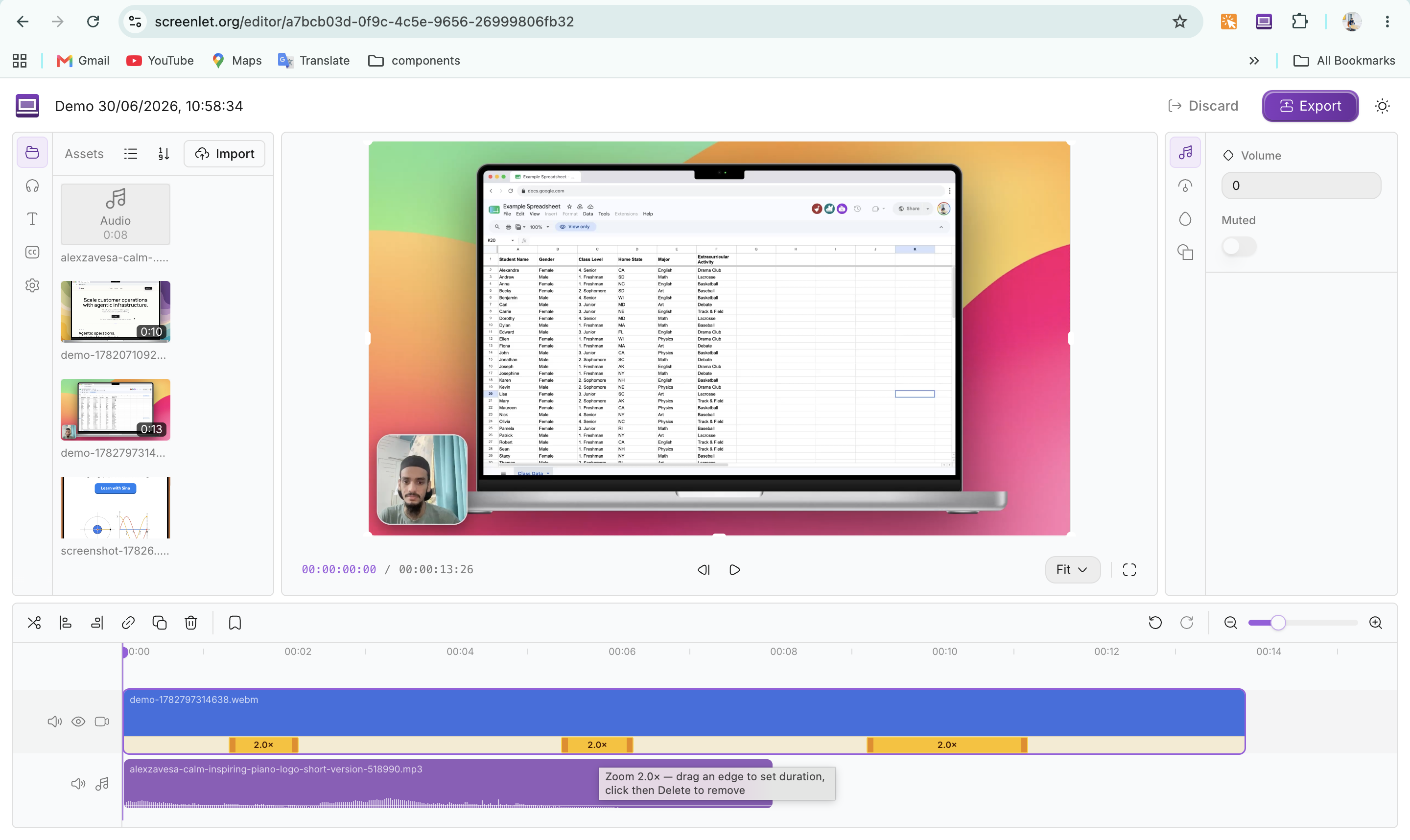
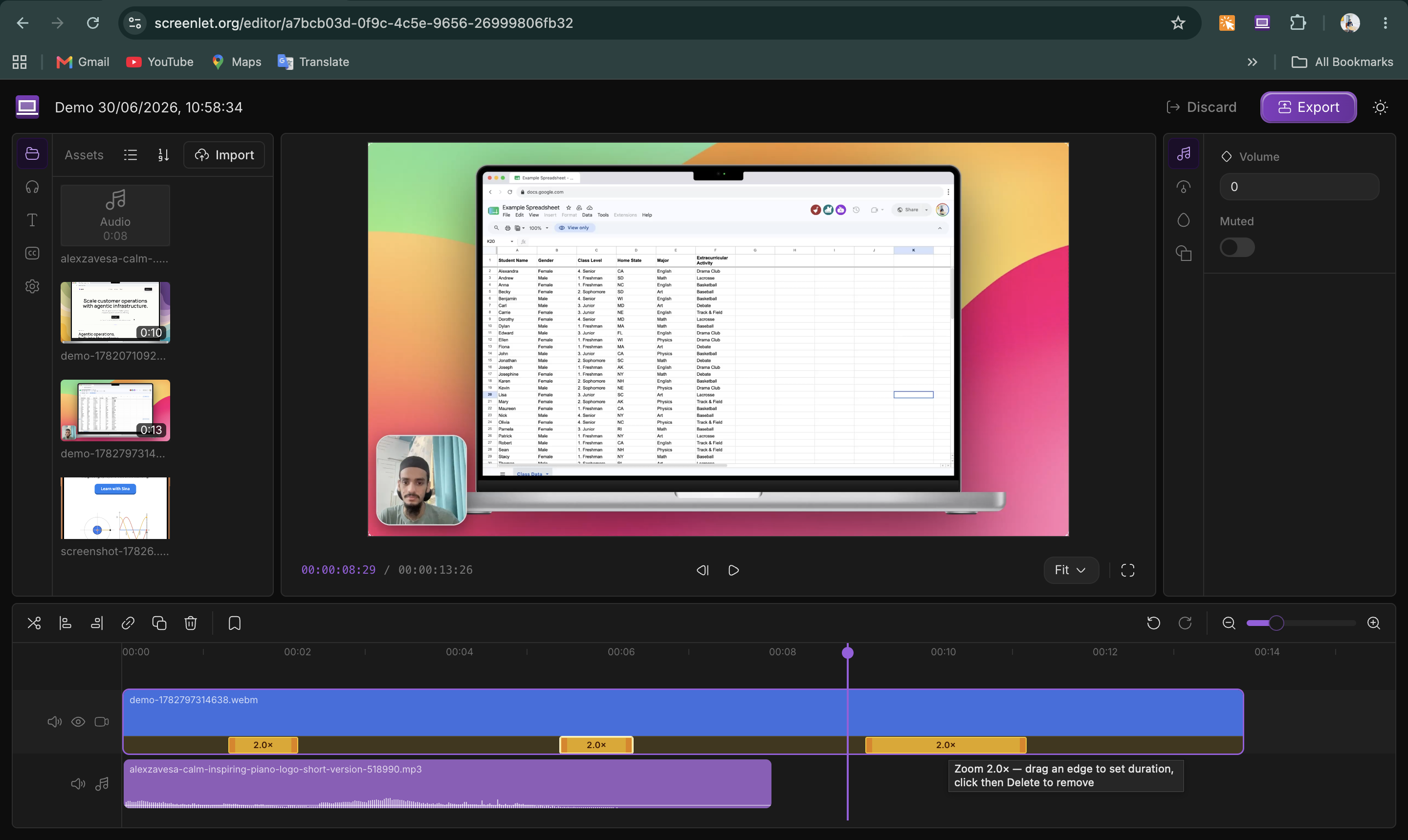
How it works
From live site to polished demo video in four steps.
Install & open any site
Add the free Chrome extension and open the site you want to show off — no signup or downloads.
Pick a mockup
Wrap the page in a real MacBook, iPhone, iPad, or Studio Display frame — or float it over a clean wallpaper.
Record your demo
Record with your webcam and voiceover — every click you make is captured for automatic zoom.
Zoom & export
Add cinematic zoom where it matters, fine-tune the timing, then export a crisp 1080p video to MP4 or WebM.
Everything in one extension
Record, narrate, and polish your demo — no extra tools, no exporting back and forth.
Wrap any site in a real device frame
Drop your site into a pixel-perfect iPhone 17 Pro Max, MacBook Pro, iPad Pro, or Studio Display frame — with simulated iOS, macOS, and Windows browser chrome.
Set the scene with gorgeous backdrops
Frame your mockup against a huge library of backdrops — from the full set of macOS wallpapers to clean gradients and solid colors — so every demo looks studio-ready.
Record yourself with webcam + mic
Drop in a draggable webcam bubble and record a microphone voiceover as you click through — all captured into one smooth HD video.
Add cinematic zoom in the editor
Add non-destructive zoom anywhere the cursor moved, fine-tune the timing as keyframes, and export to MP4 or WebM — Screen-Studio-style polish in your browser.
Made with Screenlet
Real demos recorded and polished right in the browser — swipe through to see what yours could look like.
Sheets
A spreadsheet tutorial with cinematic zoom.
ChromePilot
A product landing-page demo in an iPhone 17 Pro Max mockup.
Adil Ahmed — Portfolio
A personal portfolio site walkthrough.
Duolingo
A language-learning app demo in an iPad Pro 11 (M4) mockup.
Curvingo
A planarity puzzle demo on the Curvingo platform.
Comparisons
How Screenlet compares
An honest look at Screenlet next to the recorders people usually weigh it against. Tap any column for the full breakdown.
| Feature | ScreenletChrome extension | LoomHosted recorder | Screen StudiomacOS app | Free recordersOBS, QuickTime |
|---|---|---|---|---|
| Price | $29 once + free tier | Free + subscription | Paid license | Free |
| Runs in Chrome — no app to install | ✓ | ✗ desktop app | ✗ desktop app | Varies |
| Works on Windows & Linux | ✓ | ✓ | ✗ macOS only | Varies |
| Real device mockups | ✓ MacBook, iPhone… | ✗ | Backgrounds only | ✗ |
| Cinematic zoom editor | ✓ | ✗ | ✓ | ✗ |
| Webcam + voiceover | ✓ | ✓ | ✓ | Varies |
| Export an MP4 / WebM you own | ✓ | Paid plans | ✓ | ✓ |
| No watermark | On Lifetime | Paid plans | ✓ | Varies |
Comparison reflects general product positioning as of 2026 and can change as each tool updates its plans. Product names are trademarks of their respective owners; Screenlet is not affiliated with or endorsed by them.
One price. Yours forever.
Pay once, use Screenlet for life. Only the AI video maker is metered — everything else is unlimited.
Free
Record and edit with no signup at all.
- Device mockups, recording & zoom editor
- Webcam + voiceover, full 1080p HD
- “screenlet.org” watermark on exports
Lifetime
Everything unlocked, forever.
- No watermark
- Unlimited recordings & screenshots
- 25 AI video maker videos included
- Top up for more AI videos anytime
- Use on up to 3 devices
- All future updates
After paying, your license key is emailed to you — paste it into the extension’s settings to unlock.
Need more AI videos?
Top up anytime — credits are added to the email you bought with.
Top-ups require the Lifetime plan — without it, the purchase is refunded automatically.
Frequently asked questions
Everything you need to know about turning websites into demo videos with Screenlet.
What is Screenlet?
Screenlet is a free screen recorder built as a Chrome extension that turns any website into a polished demo or tutorial video. Wrap the page in a real device mockup, record it with your webcam and voiceover, then add cinematic zoom and export to MP4 or WebM, all without leaving your browser.
Is Screenlet a free screen recorder with no watermark?
Yes — Screenlet is a free online screen recorder you can use without signing up. The free plan adds a small screenlet.org watermark to exports; the one-time $29 Lifetime plan removes the watermark and unlocks unlimited recordings and screenshots.
Is Screenlet a good Loom or Screen Studio alternative?
Yes. As a free Loom alternative it records demos and tutorials with webcam and voiceover and exports a real MP4 file you own — not just a hosted share link — with no subscription. As a Screen Studio alternative it brings cinematic zoom and device mockups to a Chrome extension that runs on Windows and Linux too — not just macOS.
Which operating systems does the screen recorder work on?
Screenlet runs anywhere Google Chrome (or another Chromium browser) runs — Windows, macOS, Linux, and ChromeOS. There's no desktop app to install, so recording, mockups, and the zoom editor all work the same across every OS.
Do I need to sign up or install any software?
No signup and no desktop software. Just add the free Chrome extension and you can start recording right away. Mockups, recording, and the zoom editor all run inside your browser.
What's included for free, and what does the paid plan add?
Free gives you device mockups, recording, the zoom editor, and webcam + voiceover at full 1080p (with a small screenlet.org watermark). The one-time $29 Lifetime plan removes the watermark, unlocks unlimited recordings and screenshots, includes 25 AI video maker videos with affordable top-ups, and works on up to 3 devices — including all future updates.
Which devices and mockups are supported?
You can frame your site in a MacBook Pro 16, MacBook Air, Dell Latitude, Apple Studio Display, or iPhone 17 Pro Max — with simulated macOS, Windows, and iOS browser chrome — or use a wallpaper-backed floating screenshot.
What format are the videos exported in?
Videos export to MP4 or WebM at up to 1080p HD, ready to drop straight into landing pages, social posts, or app store listings.
Is my screen recording private?
Recording and editing happen locally in your browser using Chrome's tab capture — your video isn't uploaded to a server to be processed.
How do I get my license after paying?
After checkout, the thank-you page shows your license key and switches it on in the extension with one click — and Dodo Payments, our checkout provider, emails it to you too. On another computer, paste it into the extension's settings. Need more AI videos later? Top-up packs add credits to the same email you bought with — they require an active Lifetime license, so buy the plan first or the top-up is refunded automatically.
Which browsers does Screenlet work in?
Screenlet runs in Google Chrome and other Chromium-based browsers that support Chrome extensions.
Works on every OS & Chromium browser
No desktop app to install. If it runs Chromium, it runs Screenlet.



Runs on every Chromium browser — Chrome, Edge, Brave, Opera & Comet — on Windows, macOS, Linux & ChromeOS.